Become a Poppo Reseller on PoppoRecharge


English
USD


Sign up to get 5% off coupons!
How to use your coupons on Popporecharge?
2026-06-24 16:16:17new
How to Poppo Live coins recharge at alow price? Do you want to enjoy high-value Poppo recharge online services? Many users are undoubtedly interested in Poppo recharge benefits. Currently, there are no geographical restrictions on the Popporecharge; users worldwide can buy cheap Poppo coins. Combining coupons can further reduce recharge costs.
Many users take part in our platform special promotions but don’t understand which coupons they can use, how to apply them, or when new coupons become available - so they end up missing out on great savings. Below we cover coupon eligibility, full step-by-step usage instructions, and all the ways you can grab exclusive discounts.
Quickly Identify Poppo Recharge Options with Applicable Coupons
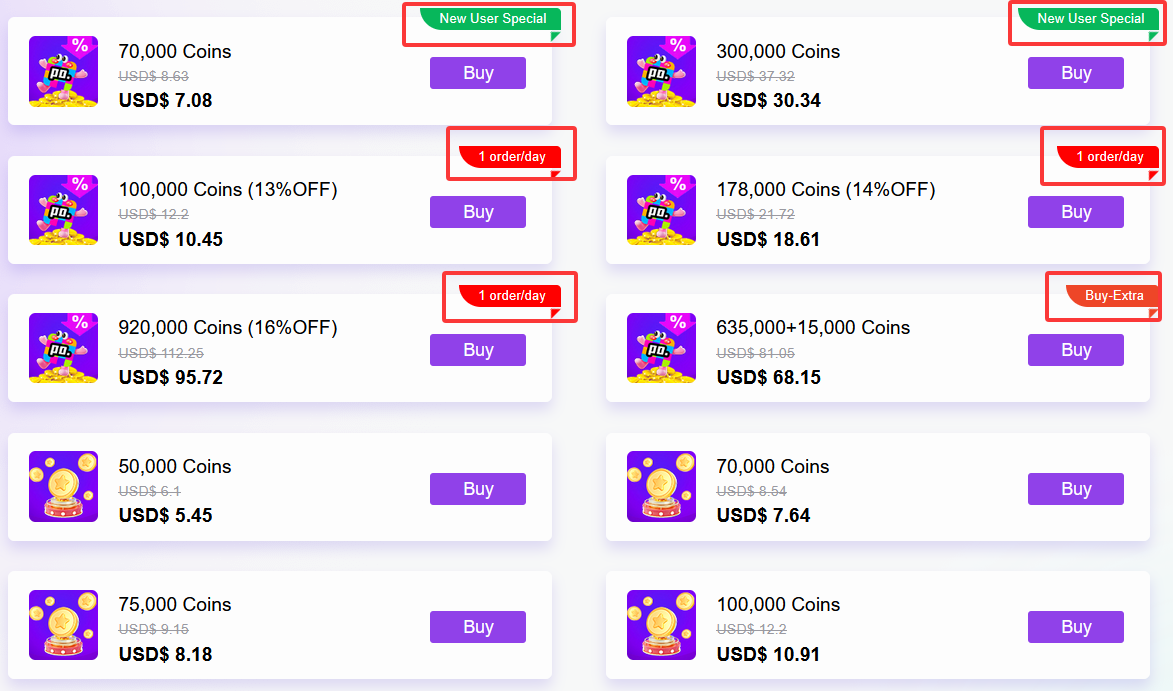
Before topping up your Poppo Live Coins online, you first need to distinguish between the two types of recharge options on Popporecharge. The usage rights of coupons for different options are completely different. You can quickly distinguish them based on the page labels to avoid operational errors:
- Special Offer Options (with exclusive labels): These Poppo coin options will have clear labels, including popular benefits such as new customer exclusives, daily orders, and buy-extra offers. These Poppo coin recharge options have already undergone an official price reduction, and the price is currently the lowest on the platform. Therefore, they cannot be combined with any coupons.
- Non-Discounted Options (No Promotional Tags): Regular Poppo Coin recharge options without any tags can be deducted using platform coupons.
How to Use The Coupons?
After confirming the non-discounted option, follow these three simple steps to easily use the coupon. The entire process is simple:
- Select the corresponding recharge option: Go to the Poppo coin recharge page, scroll down the page, avoid discounted Poppo coins top up with tags, and select a non-discounted Poppo Coin recharge option without tags. Accurately enter your Poppo user ID to ensure your recharge account is correct.
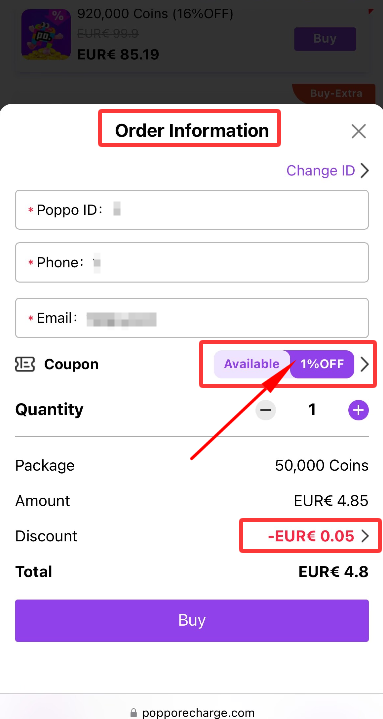
- Change Coupon: After entering the order information confirmation page, the system will automatically select a coupon for the user. If you want to change to a coupon of a different denomination or type, simply click the button to the right of the coupon to enter the coupon list page and manually select the coupon you want to use.
- Submit Order and Complete Payment: After verifying all information is correct, click the "Buy" button at the bottom of the page and follow the platform's instructions to complete the payment. You will then successfully complete the Poppo Live top up with the discount.
How to Redeem Coupon Code?
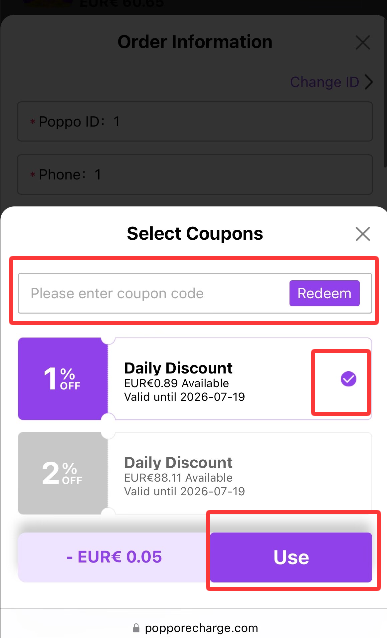
If you have received an exclusive coupon code, you may redeem it directly on the coupon page. Follow the steps below:
- Tap the coupon button on the order information page;
- Enter your coupon code on the coupon page and click "Redeem";
- Once redeemed successfully, the system will automatically select the coupon for you.
Conclusion
The key to effectively using coupons for low-cost Poppo Live recharge is to distinguish between special offer and regular offer options. Remember the core rule: coupons cannot be used on special offer options, while coupons can be combined on regular offer options. If you have any questions about using coupons or the order process, please contact our online customer service or add our customer service WhatsApp ID: +85262798355 for assistance. Enjoy discounted Poppo recharge anytime, anywhere.